

Best overall: Day One. Best for low-effort mood tracking: Daylio. Best for guided gratitude: Five Minute Journal. Best for an iPhone-centered routine: Apple Journal. This 2026 guide compares journaling tools for anxiety and depression by writing effort, structure, and how you can use entries alongside counseling.
- Among the best journaling apps for anxiety, Day One is the default for flexible, open-ended writing.
- Daylio suits mood tracking when depression or anxiety makes writing a full entry feel difficult.
- Five Minute Journal provides gratitude prompts; Apple Journal suits an iPhone-centered reflection routine.
- Calmcharleston offers counseling for anxiety and depression; journaling apps do not replace clinical assessment or treatment.
Why this matters
A journal can give you somewhere to record worries, feelings, and experiences before discussing them in therapy. But an app that encourages more writing is not automatically the right choice: repeated writing about the same fear can become another way to dwell on it.
Choose the format you can use without turning reflection into an obligation. If you want professional support alongside journaling, Calmcharleston offers individual and telehealth therapy for people dealing with anxiety, depression, and other concerns.
These recommendations compare journaling formats, not proven treatment outcomes. An app’s prompts, reminders, or mood charts do not establish that it treats a mental health condition.
What makes the best journaling apps for anxiety?
For this 2026 shortlist, the deciding question is practical: does the format help you express something useful without making the task harder?
- Writing effort: A mood check-in and an open-ended diary demand different amounts of energy. Match the task to what you can manage.
- Prompt structure: Guided questions help when a blank page feels overwhelming; open writing leaves more room for complicated experiences.
- Review value: Entries should give you something useful to revisit, such as a recurring concern or a question for your therapist.
- Privacy fit: Check current policies, device access, account settings, and deletion controls before recording sensitive information.
- Emotional fit: Skip prompts that leave you feeling pressured to be positive or to document painful details.
No single format wins every criterion. A detailed diary offers flexibility, while a mood tracker reduces the amount you need to write.
Journaling apps at a glance
| App | Best for | Standout feature | Key limitation |
|---|---|---|---|
| Day One | Open-ended reflection | Written entries with optional photos | A blank page requires you to supply the structure |
| Daylio | Low-effort mood tracking | Mood and activity logging with optional notes | Mood labels cannot capture every detail of an experience |
| Five Minute Journal | Guided gratitude | Structured gratitude and reflection prompts | A gratitude-centered format can feel mismatched during distress |
| Apple Journal | An iPhone-centered routine | Journaling suggestions and personal entries | Its Apple-centered workflow is not a universal device fit |
The 2026 ranking prioritizes distinct use cases rather than declaring one app clinically better than another. Check current features and device requirements before committing sensitive entries to any service.
1. Day One: best journaling app for open-ended reflection
Day One is a digital journal for recording written entries and adding material such as photos. Its open format lets you describe an anxious moment in your own words rather than selecting a predefined feeling.
Day One is the best default for people who want open-ended journaling, not a prescribed mental health program. You supply the questions, which is useful when your concerns do not fit a standard prompt.
Day One pros
- Flexible entries give complicated experiences room without requiring a particular emotional label.
- Optional photos let you record context without describing everything in writing.
- Your own questions can connect entries to topics you want to discuss in therapy.
Day One cons
- Open-ended writing gives you little direction when you do not know where to start.
- A detailed diary can become repetitive if you keep restating a worry without changing the question.
Best for: People who already like writing or want control over what an entry contains.
Try a bounded prompt: write 1 sentence about what happened, then identify what you need next. You can add detail when it serves a purpose rather than treating a long entry as the goal.
Verdict: Buy into Day One’s open-ended format if flexibility matters more than guided exercises; skip it if blank pages consistently stop you.
2. Daylio: best journaling app for low-effort mood tracking
Daylio combines mood and activity logging with optional written notes. You can record a check-in without composing a full diary entry, then add context when you have the energy.
That makes Daylio a practical format to consider when low motivation or anxious overthinking turns writing into a large task. The advantage is reduced writing effort—not evidence that a mood tracker treats depression.
Daylio pros
- Mood selection provides a starting point without requiring a paragraph.
- Activity logging lets you record what was happening around a check-in.
- Optional notes preserve details that a mood label leaves out.
Daylio cons
- A mood category compresses experiences that can include several conflicting feelings.
- Activity and mood patterns do not establish what caused a change in how you felt.
Best for: People who want brief check-ins rather than a writing-centered practice.
Add a short note when a label feels misleading. Feeling anxious before a difficult conversation and anxious without an obvious trigger can deserve different discussions, even if you select the same mood.
Verdict: Buy into Daylio’s check-in format if writing effort is your main barrier; skip it if you want detailed narrative reflection.
3. Five Minute Journal: best journaling app for guided gratitude
Five Minute Journal uses structured gratitude and reflection prompts. Its format gives you a question to answer instead of asking you to invent a topic each time you open the app.
Choose this approach because you want gratitude practice, not because you think you should feel grateful instead of distressed. A useful entry can acknowledge something meaningful without denying sadness, anger, or fear.
Five Minute Journal pros
- Predetermined prompts remove the task of choosing a writing topic.
- Gratitude questions direct attention toward experiences you want to acknowledge.
- A consistent structure makes the writing task more predictable.
Five Minute Journal cons
- Gratitude prompts can feel invalidating when you need to name pain directly.
- A structured format leaves less room for a detailed account of a difficult experience.
Best for: People who actively want gratitude-focused reflection and find open writing too unstructured.
Do not turn the exercise into a test of whether you are positive enough. If a prompt increases guilt or self-criticism, choose another format or discuss that reaction with your therapist.
Verdict: Buy into Five Minute Journal’s guided format if gratitude feels useful; skip it if the prompts make you feel corrected rather than heard.
4. Apple Journal: best journaling app for an iPhone-centered routine
Apple Journal supports personal entries and offers journaling suggestions. It suits readers who want reflection within an Apple-centered device routine rather than choosing a mood-tracking system.
Suggestions provide starting points, but you do not have to accept them. An ordinary event can be a useful subject; a suggested memory is not necessarily something you want to revisit.
Apple Journal pros
- Suggestions offer a starting point when choosing a topic is the main obstacle.
- Personal entries leave room for your own account rather than only a mood score.
- The Apple-centered format fits readers who prefer journaling on their iPhone.
Apple Journal cons
- An Apple-centered workflow is not the right fit for every device setup.
- Suggested experiences do not necessarily match the emotional issue you want to explore.
Best for: People who prefer journaling on an iPhone and want optional inspiration.
Review suggestion and privacy settings before making the app part of your routine. Decide which experiences belong in a digital journal and which you would rather discuss without creating a written record.
Verdict: Buy into Apple Journal’s format if it fits how you use your devices; skip it if your priority is structured mood tracking.
How to use a journal without feeding the worry
Give the entry an endpoint. For your first attempt, set a 2-minute timer as a personal boundary, not a therapeutic dosage or a promise of relief.
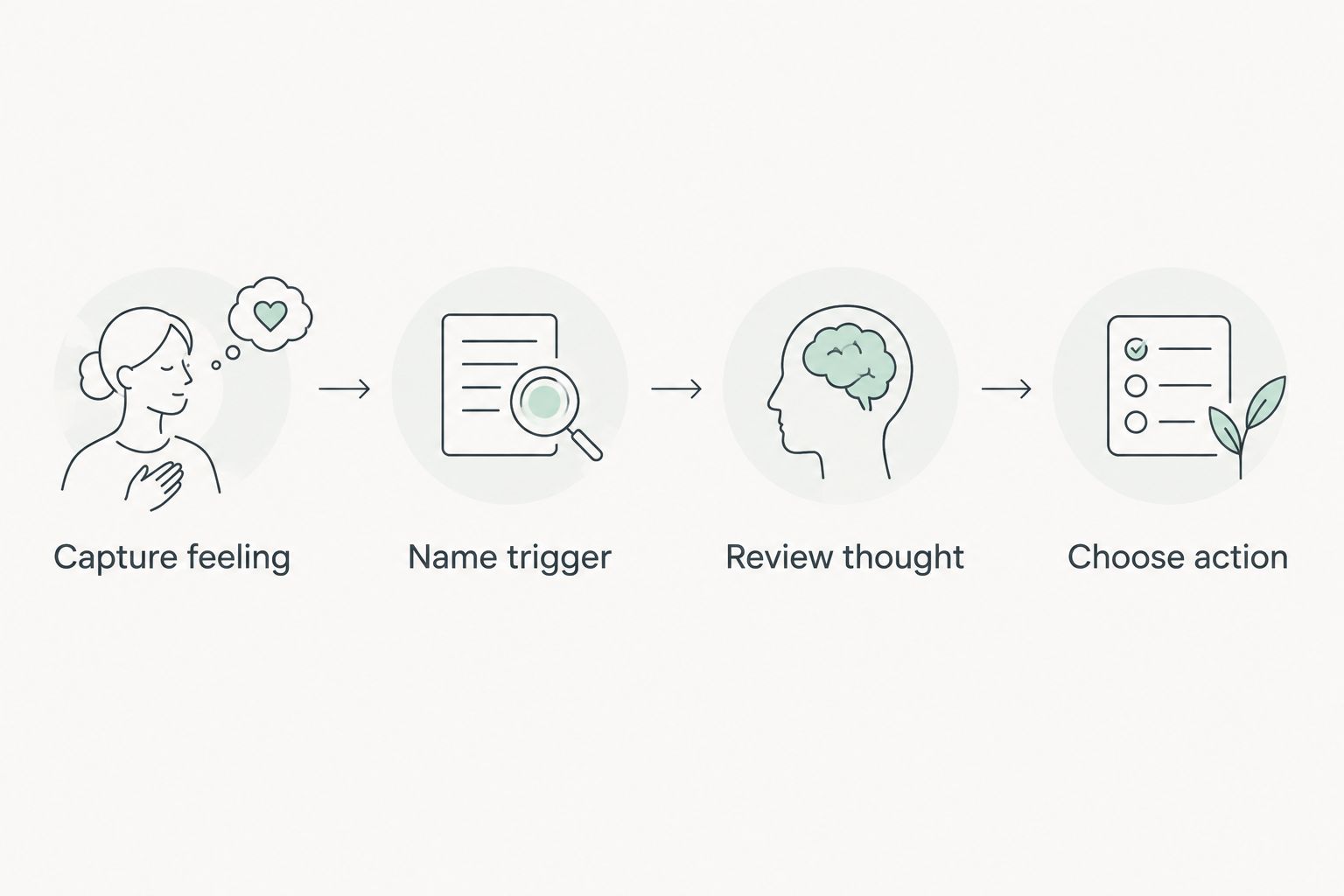
Use this sequence when you need structure:
- Capture feeling: Describe the emotion without judging yourself for having it.
- Name trigger: Record what happened, separating observable events from assumptions.
- Review thought: Identify the interpretation you are making, rather than treating it as established fact.
- Choose action: Name a manageable next step, including stopping the entry when you have written enough.
An entry does not need to solve the underlying problem. Its job can be as small as helping you explain a concern clearly at your next appointment.
If writing leaves you more distressed, stop. You do not need to push through painful memories, produce a complete account, or continue an exercise simply because an app prompts you.
Check privacy before your first sensitive entry
For a 2026 app decision, review current policies rather than assuming every journal handles your information the same way. Avoid putting another person’s identifying details into an entry unless you have considered the implications.
Check these points before recording sensitive material:
- Device access: Who can open your device or read notification previews?
- Account access: Is the account shared, and where are you signed in?
- Data handling: What does the current privacy policy say about collection and use?
- Exit options: Can you export or delete entries in a way that meets your needs?
A lock on your phone does not answer every question about account or service-level privacy. If recording something digitally feels unsafe, you can bring the topic to therapy without creating an app entry.
How the apps were ranked
This 2026 ranking compares writing effort, prompt structure, review value, privacy questions, and emotional fit. It does not represent hands-on clinical testing or establish that one app reduces symptoms more than another.
Day One earns the default position for flexible writing. Daylio, Five Minute Journal, and Apple Journal each serve a different preference: brief tracking, guided gratitude, and an iPhone-centered routine.
Which journaling app should you choose?
Choose Day One if you are undecided and want an open journal. Choose Daylio when writing itself is the obstacle, Five Minute Journal when you specifically want gratitude prompts, or Apple Journal when its device-centered format suits you.
Review your first 3 entries as a personal checkpoint. Ask whether the format helped you express something, created another obligation, or encouraged you to keep circling the same worry.
Calmcharleston offers anxiety and depression counseling for teens, adults, and seniors. Bring a journal excerpt or a summary if it helps you explain what has been happening; you do not need a complete diary to ask for support.
Explore counseling for anxiety and depression
Individual and telehealth therapy for teens, adults, and seniors in Charleston and Mount Pleasant.
FAQ
What's the best journaling app for anxiety in 2026?
Day One is the default recommendation for open-ended writing; Daylio is the better format when you want brief mood check-ins. Choose by writing effort and structure, not an assumption that either app treats anxiety.
Which journaling app should I choose when depression makes writing difficult?
Daylio is the strongest fit on this shortlist for low-effort logging because written notes are optional. A short check-in is an option, not a requirement, and tracking does not replace depression treatment.
Is Day One better than Daylio for anxiety journaling?
Day One is better for detailed written reflection, while Daylio is better for mood and activity check-ins. Neither format is universally better for anxiety; the useful distinction is how much you want to write.
Can journaling make me feel more anxious?
Journaling can leave you feeling more distressed, especially when writing becomes repetitive or brings up painful material. Stop the exercise if that happens and discuss the reaction with a qualified mental health professional.
Should I use gratitude prompts when I feel depressed?
Use gratitude prompts only if the format feels useful rather than pressuring. Five Minute Journal centers gratitude and reflection, but you do not need to replace difficult feelings with positive statements.
Can a journaling app replace therapy for anxiety or depression?
A journaling app does not replace clinical assessment or treatment for anxiety or depression. Calmcharleston offers counseling for these concerns, and journal entries can serve as optional discussion material.
What should I check before putting private thoughts in an app?
Check device access, account access, current data-handling policies, and export or deletion options. Avoid recording sensitive details until you understand the settings and policies that apply to your account.
One last thing
For your 2026 routine, judge the journal by what it helps you do after closing it—not by how much you write. A short entry that helps you name a need is more useful than a detailed record you feel compelled to maintain.
You do not need to document your distress perfectly to deserve help. Journaling is optional; support is not something you have to earn through consistent tracking.